Streamline Your Publishing with Canva Book Cover Templates
When you are ready to launch a journal, planner, or notebook on Amazon KDP, the cover design is often the biggest hurdle. You need a file that meets strict technical requirements while still looking professional enough to stand out in a crowded marketplace. This is where using high-quality Canva Book Cover Templates changes the game. Instead of starting from a blank canvas or wrestling with complex software like InDesign, you can utilize pre-structured layouts designed specifically for the 6 x 9 inch standard. These templates act as a bridge between amateur DIY projects and expensive custom design work, offering a polished starting point that respects publishing industry standards.
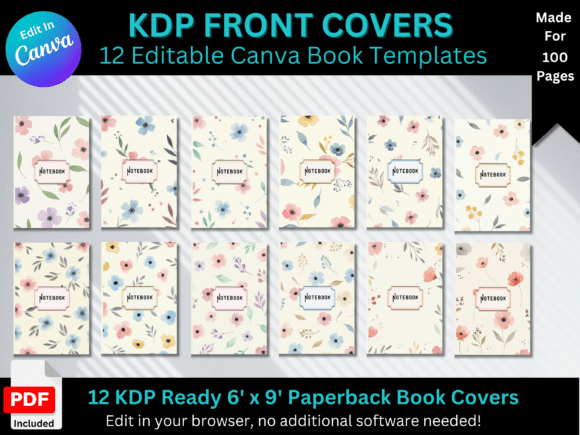
Consider a set like the 12 Floral Journal Front Cover Templates. On the surface, these are visually driven assets characterized by organic shapes, botanical illustrations, and modern typography. However, their true value lies in their structure. They are not just pretty pictures; they are functional design assets built with visual hierarchy in mind. The "floral" aesthetic here serves a specific purpose—it evokes feelings of growth, mindfulness, and creativity, which aligns perfectly with the content inside a diary or notebook. The visual personality is soft yet bold, balancing intricate botanical elements with clean, legible text areas. This combination ensures that the cover communicates the right emotion immediately, whether viewed as a thumbnail on a screen or a physical book on a shelf.
Design Flexibility and Brand Identity
One of the most significant advantages of using editable Canva Book Cover Templates is the ability to tailor the design to your specific brand identity. A pre-made template is rarely a final product; it is a foundation. For an entrepreneur or small business owner, this flexibility is vital. Perhaps you are creating a series of wellness journals for your community. You can take the floral base and adjust the color palette to match your existing branding. You might swap a serif typeface for a sans serif font to make it feel more corporate, or introduce a script font to add a personal, intimate touch.
This customization process allows for consistency across your entire product line. If you are a content creator or blogger, your audience expects a certain aesthetic. By modifying these templates, you ensure that your new product feels like a natural extension of your digital presence. The ability to change fonts and elements isn't just about preference; it is about brand recognition. When a customer sees your notebook on Amazon, the design should instantly feel familiar if they are already part of your ecosystem. The "modern typography" found in these sets usually features a mix of weights and styles, allowing you to create a strong visual hierarchy that guides the viewer's eye from the title to the subtitle and author name without confusion.
Practical Application for Publishing and Marketing
For those working in editorial design or packaging design, the utility of these templates extends beyond the cover image. A well-designed cover is a marketing tool. It functions as a thumbnail on retail sites, a hero image in email campaigns, and a centerpiece for social media graphics. When selecting a template, you must evaluate its scalability. Does the design hold up when shrunk down to the size of a postage stamp on a mobile phone? Floral designs can sometimes be tricky here, but a good template balances intricate details with high-contrast text areas to ensure readability at any size.
Here is a practical workflow for utilizing these assets effectively:
- Evaluate the File Structure: Ensure the template comes with a link that opens directly in Canva and a print-ready PDF. The KDP-ready PDF is essential for meeting Amazon’s bleed and trim specifications.
- Test Font Pairings: While the template includes a suggested layout, experiment with font pairing. If the header uses a display font, ensure the subtitle uses a clean sans serif or serif font for legibility. Avoid using two complex fonts that compete for attention.
- Check Commercial Licensing: Most template bundles include a license for commercial use, but always verify. If you are selling the journals, you need to be certain the premium font or graphics included are cleared for resale.
- Match Interior to Exterior: A cohesive experience matters. If the cover features specific floral motifs, try to subtly incorporate those into the interior pages if possible, creating a unified brand identity product.
Ultimately, these templates serve as a practical solution for the modern publisher. They remove the technical barriers of file setup and allow you to focus on the creative and strategic aspects of your project. Whether you are a hobbyist creating gifts or a marketer building a lead magnet, the efficiency and professional finish of Canva Book Cover Templates provide a distinct competitive edge in the self-publishing world.