Streamline Your Publishing: 4 Blank Calendar Templates for Canva & KDP
In the world of digital publishing and physical product creation, the gap between a good idea and a finished product is often just a matter of workflow. Whether you are a self-publisher looking to dominate the Amazon KDP marketplace, a coach selling customized planners to your clients, or a small business owner organizing your annual strategy, the foundation of your project matters. This is where the utility of a versatile design asset becomes undeniable. We are looking at a set of 4 Blank Calendar Templates, specifically engineered for Canva and KDP Interiors. These are not just static images; they are fully editable frameworks designed to save you hours of layout time while giving you the exact planner you need.
The Anatomy of the Template Set
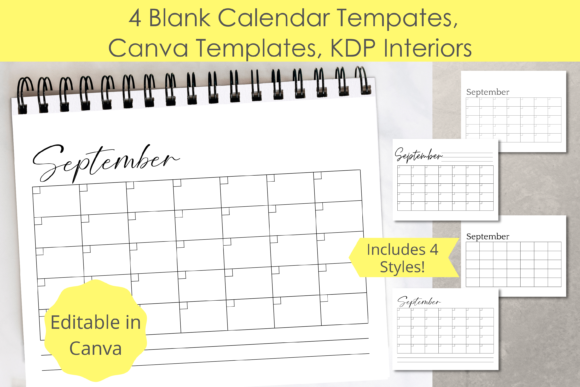
Understanding the structure of these templates is the first step to unlocking their potential. This specific set includes 12 months of content across four distinct, undated horizontal styles. The lack of pre-printed dates is a strategic advantage for creators. It allows you to reuse the same interior year after year without purchasing new licenses or redesigning your core layout. The visual personality of these templates is defined by their horizontal orientation, which provides a wider canvas than standard portrait planners. This makes them particularly effective for project management, social media content calendars, and detailed weekly scheduling.
The four specific variations included in this package offer subtle but important differences in information hierarchy:
- Undated horizontal with top notes: This style prioritizes context. The "notes" section at the top allows users to define the month's theme, goals, or a specific project title before getting into the daily details. It is ideal for strategic planning and business use.
- Undated horizontal with blank boxes: This is the purest form of a calendar grid. Without lines or designated note areas inside the box, it offers maximum flexibility. It serves as a visual container for anything from habit tracking to meal planning, acting as a versatile canvas for your unique content.
- Undated horizontal with date boxes: While still undated, these boxes imply a structured entry system. The visual "boxes" help separate distinct tasks or days, creating a clear visual hierarchy that guides the eye from left to right. This structure is excellent for readability in fast-paced environments.
- Undated horizontal with bottom notes: Placing notes at the bottom changes the reading flow. It allows the calendar grid to take center stage visually, with the notes serving as a footer for reflection, end-of-month summaries, or "carry-over" tasks. This style often feels more open and less cluttered at the top.
Visual Style and Functional Appeal
From a design perspective, these templates embrace a "less is more" philosophy. Because they are blank canvases, they do not suffer from the "novelty font" problem where a specific typeface dictates the entire mood of the planner. Instead, the visual appeal lies in the clean lines and balanced white space. This neutrality is their greatest strength. When you open these files in Canva, you are working with a professional layout that respects the principles of visual hierarchy, but it does not scream a specific aesthetic. This means a wedding planner can use the same base template as a corporate logistics manager simply by changing the typography and color palette.
The horizontal format specifically caters to modern workflows. We are used to reading spreadsheets, wide-screen monitors, and landscape documents. These templates mimic that wide-field vision. They are excellent for editorial design where you might need to track publication dates across a wide timeline, or for packaging design projects where you need to visualize the monthly rollout of a product line. The "blank" nature ensures that the template serves the content, rather than the content fighting against a pre-designed background.
Customization: Making the Template Your Own
The true value of these assets is realized in the editing phase. Because the files are editable in Canva, you have access to a massive library of fonts, elements, and upload capabilities. This is where your brand identity comes into play. You are not buying a finished product; you are buying a structural skeleton.
Here is how you can manipulate these templates to fit specific professional needs:
- Typography and Hierarchy: You can select a premium font that matches your brand voice. For example, using a bold sans serif font for the headers (Month names) and a light, legible serif for the body text creates a professional contrast. If you are designing for a creative agency, you might swap the header font for a stylish display font or script font to add personality without sacrificing the grid's legibility.
- Brand Consistency: By adding your logo or decorative elements, you turn a generic calendar into a marketing asset. A real estate agent could add their headshot and contact info to the "notes" section, creating a branded gift for clients that sits on their desk all year.
- Functional Add-ons: Don't limit yourself to text. You can insert clip art, illustrations, or even image placeholders. A fitness coach could use the "blank box" style and insert small icons representing different workout types (dumbbell, running shoe, yoga mat) to create a custom workout planner.
Practical Applications for Entrepreneurs and Creators
The versatility of the 4 Blank Calendar Templates makes them suitable for a wide range of commercial and personal projects. For those involved in KDP publishing, these templates are a goldmine. The KDP market is saturated with generic planners. By using these templates, you can niche down. Instead of a "General Planner," you can create a "Social Media Content Calendar for Influencers" or a "Wedding Countdown Planner." The structure is already there; you just need to adjust the context.
For web design and social media graphics, these templates can be repurposed. You can export a single month as a PNG or JPG to post as a "Content Schedule" for your audience, or use the grid as a background for an Instagram story layout. The horizontal orientation works perfectly for landscape video thumbnails or email headers.
Even for internal business use, the value is significant. Small business owners often struggle with visual hierarchy in their own planning. Using a pre-structured template ensures that important dates aren't lost in a sea of scribbles. It brings a level of professionalism to your internal operations that can improve efficiency.
Evaluating Fit and Final Recommendations
When deciding if this set is right for you, consider your need for flexibility versus structure. If you need a rigid daily schedule with specific time slots, this might not be the right fit. However, if you need a macro-level view of your month—whether for business planning, content scheduling, or habit tracking—the horizontal undated format is superior.
From an SEO and E-E-A-T (Experience, Expertise, Authoritativeness, Trustworthiness) perspective, creating a high-quality digital product using these templates establishes you as an authority. When you sell a planner that is well-designed, easy to read, and visually consistent, you build trust with your audience. It shows that you care about the user experience.
Ultimately, these Canva Templates and KDP Interiors are tools to bridge the gap between your creative vision and the technical execution. They provide the grid, the spacing, and the professional layout, while you provide the expertise, the branding, and the content. By combining these templates with other printables or documents, you can build a comprehensive organizational system that not only looks good but functions seamlessly in your daily life or business operations.