Designing Custom Car Coasters: A Creative Guide
There's a unique satisfaction in creating something functional and beautiful, especially when it solves a small, everyday problem. Car coasters—those handy little discs that catch condensation and protect your vehicle's cup holders—are a perfect example. They're a popular item for personal use, thoughtful gifts, and even a profitable niche for small business owners. The challenge often lies in starting from scratch. That's where a versatile template system like the 2.4" Car Coaster Canva & SVG Templates becomes an indispensable design asset, providing a professional foundation for your creativity.
The Anatomy of a Perfect Template
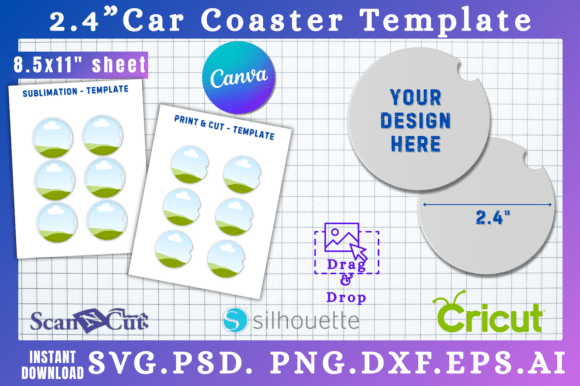
This isn't just a set of files; it's a complete creative toolkit designed for real-world application. At its core, it's a precisely sized 2.4-inch circular canvas, optimized for standard car coaster blanks. The visual appeal lies in its clean, uncluttered starting point. You're not fighting someone else's design choices; you're working with a neutral, professionally measured template that ensures your final product fits perfectly. The personality is one of potential—it's a blank slate that can adopt any style, from rustic farmhouse to sleek modern typography, depending on your vision.
The real strength is in the delivery of multiple file formats. This practical approach acknowledges that creators use different tools. The SVG and DXF files are perfect for vector-based software like Cricut Design Space or Silhouette Studio, allowing for flawless cutting on vinyl or cardstock. The PSD file offers layered control for Photoshop users, while the PNG with a transparent background is ideal for quick mockups or use in other graphic design software. The inclusion of a direct Canva link is particularly thoughtful, opening the door for those who prefer a drag-and-drop interface, even with a free account. This multi-format approach ensures the template works with your existing workflow, not against it.
From Personal Project to Polished Brand Asset
The applications for a well-designed coaster template extend far beyond a one-time craft project. For a small business owner, it's a gateway to consistent packaging design and branded merchandise. Imagine creating a set of coasters featuring your logo, a brand pattern, or a witty tagline related to your niche. They become a low-cost, high-impact marketing tool—something tangible a customer can use daily, keeping your brand top-of-mind. This is where the template transitions from a simple craft file to a key component of your brand identity toolkit.
For designers and content creators, this is a fantastic addition to your library of design assets. You can quickly produce mockups for client presentations, design unique promotional items for a blog launch, or create themed sets for seasonal marketing campaigns. The ability to instantly download and customize means you can move from concept to a presentable prototype in minutes, not hours. This efficiency is crucial when managing multiple projects or responding to client requests for custom merchandise ideas.
Thinking about font pairing and visual hierarchy within the 2.4-inch circle is an excellent exercise in constrained design. A bold, display font might work for a single impactful word or monogram, while a clean sans serif font ensures readability for a phone number or website URL. Combining a delicate script font with a sturdy serif can create an elegant, balanced look. The small canvas forces you to prioritize clarity and simplicity, which are hallmarks of good modern typography. It teaches you to make every element count, a skill that translates directly to larger projects like web design and editorial design.
Practical Tips for Your Coaster Design
When you open your chosen file, start with the basics. First, ensure your design is truly centered. Use the template's guide as your boundary—any critical text or graphics should have a small bleed area from the edge to account for slight variations in cutting. For vinyl decals, a simple, high-contrast design often has the most professional result and easiest application. Test your color choices on-screen, but remember that screen colors can vary; if you're ordering prints, consider ordering a sample first.
For those selling their creations, think about creating themed collections. A "Road Trip" series with retro fonts and map motifs, a "Pet Lover" set with paw prints and playful typefaces, or a minimalist "Monogram" collection appeals to different audiences and increases perceived value. This is where your understanding of your target market—whether they are hobbyists, gift-buyers, or businesses—directly influences your design strategy. The template gives you the consistent physical format; your creativity provides the marketable content.
Choosing Your Creative Workflow
The beauty of this system is the flexibility it offers in choosing your creative workflow. If you're comfortable with vector software like Adobe Illustrator or the free Inkscape, the SVG file gives you ultimate control over every anchor point and curve. This is ideal for creating intricate, scalable designs. For those who think in layers and enjoy photo manipulation, the PSD file is your playground. And for the entrepreneur who needs to move quickly, the Canva link is a game-changer. You can access a vast library of fonts, graphics, and photos within Canva to build your design, then download a high-quality file for production.
Remember, this is a commercial font-friendly template system. The files themselves are your canvas, and you are free to incorporate any fonts you have the rights to use, whether they are free for commercial use or premium fonts you've licensed. Always double-check the licensing of any typeface or graphic you use in a product you intend to sell. The template's value is in its precise dimensions and multi-format delivery, not in restricting your creative or commercial options.
Ultimately, a tool like the 2.4" Car Coaster Canva & SVG Templates is about empowerment. It removes the technical barrier of getting started and lets you focus on the enjoyable part: the design. It's a practical solution that fuels creativity, supports small business growth, and results in a tangible product people appreciate. Whether you're making a set for your own car, designing a unique wedding favor, or building a product line for your Etsy shop, this template provides the reliable foundation you need to create with confidence and professionalism.