Retro Vibes Unlocked: Designing with Birthday Celebration Canva Templates
There’s something magnetic about the 90s aesthetic. The grainy photo quality, the bold block lettering, and the unapologetically loud color palettes aren’t just nostalgic; they are a current design powerhouse. If you are looking to capture that specific energy for a client project or a personal gift, the Birthday Celebration Canva Templates collection is your new secret weapon. This isn't just about slapping a photo on a shirt; it’s about understanding the visual language of an era and applying it with modern precision.
The Anatomy of a Bootleg Masterpiece
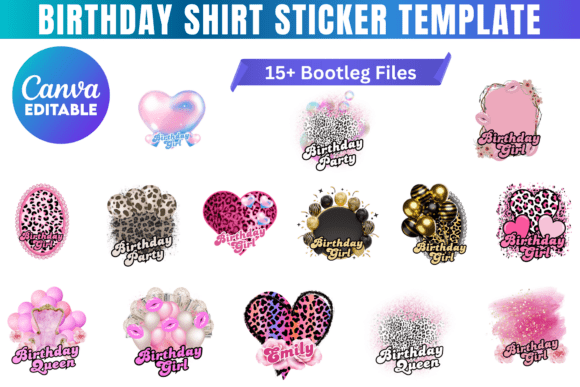
When we talk about "bootleg" style in design, we aren't referring to low quality. We are referencing a specific genre of graphic design—often found on vintage rap t-shirts and fan merchandise—that prioritized impact over subtlety. The Birthday Celebration Canva Templates lean heavily into this visual style. Think high-contrast borders, often in gold or neon, framing a central portrait. The typography usually features heavy sans-serif or display fonts that demand attention.
The personality of these templates is loud, fun, and deeply personalized. The style works because it mimics the look of vintage merchandise, creating an immediate emotional connection. It suggests that the subject of the photo is a "star" or a "legend," which is exactly the kind of energy you want for a milestone birthday or a unique gift. The visual hierarchy is rigid but effective: the face is the hero, the text provides the context, and the border contains the chaos.
Strategic Applications: Beyond the Birthday Shirt
While these assets are marketed as Birthday Celebration Canva Templates, limiting them to just birthdays would be a mistake for any creative professional. The 90s bootleg aesthetic is a versatile tool in your design assets library. Here is how you can apply this style across various mediums:
- Apparel and POD: This is the obvious one. For small business owners running a Print-on-Demand store, these templates are invaluable. You can offer a "Custom Retro Portrait" service. The design structure ensures that the image remains legible even on cotton fabric, which is a common struggle with photographic prints.
- Social Media Graphics: Use these templates for Instagram posts or TikTok thumbnails. The bold, bordered style stops the scroll. It works exceptionally well for "Employee of the Month" posts, "Client Spotlight" features, or celebrating team wins. It breaks the monotony of standard corporate graphics.
- Event Branding: If you are organizing a themed party, a reunion, or even a product launch with a nostalgic vibe, these designs can serve as the foundation for your invitations, flyers, and digital tickets. The consistency of the template ensures your brand identity remains cohesive from the invite to the event signage.
- Merchandise: Think beyond t-shirts. This style translates beautifully to mugs, posters, and tote bags. The high-contrast nature of the design ensures it pops on various surfaces.
Design Mechanics: Hierarchy and Readability
From a typography perspective, the Birthday Celebration Canva Templates handle a specific challenge well: balancing a busy photo with readable text. In bootleg designs, the text is often a mix of a heavy display font for the name and a cleaner sans-serif for the details.
When customizing these templates, pay attention to the visual hierarchy. The main name should always be the loudest element after the photo. If you are editing the text, stick to two typefaces maximum to avoid visual clutter. The templates usually come pre-set with font pairings that work, but if you swap them out, ensure your replacement has similar weight and presence.
Readability is paramount here. Because the designs are "loud," you need to ensure the text doesn't get lost in the busy background patterns or the photo itself. Use the opacity settings in Canva to darken the background slightly if the image is too bright, ensuring your white or neon text remains legible. This is a practical application of modern typography principles—contrast is key to engagement.
Practical Workflow for Customization
For the designers and entrepreneurs reading this, efficiency is everything. These Canva templates are designed to be easy to use, requiring no advanced technical skills. However, to get a professional result, follow this workflow:
- Image Selection: The template relies on a central portrait. Choose a high-resolution image with a clean background or a background that contrasts well with the template's border. Photos with good lighting on the face work best.
- Cropping and Masking: Use the clipping masks provided in the Canva file to fit the photo. Ensure the eyes are centered or slightly above the center line for the most engaging composition.
- Color Harmony: While the templates have set colors, you can tweak them to match a specific brand identity or the subject's favorite colors. Use the color picker to sample colors from the photo itself to create a cohesive palette.
- Export Settings: For t-shirt printing (DTG or Sublimation), export as a PNG with a transparent background. For social media, a high-quality JPG is sufficient.
Licensing and Commercial Use
A crucial note for business owners: these are digital design assets intended for personal or commercial use to create physical products. This means you can legally sell the t-shirts, mugs, or posters you create using these templates. However, you cannot resell the digital template files themselves. This distinction is vital for maintaining ethical business practices and respecting the original creator's work.
By integrating these Birthday Celebration Canva Templates into your workflow, you gain access to a niche but highly popular aesthetic. Whether you are creating a one-off gift for a friend or building a product line for your store, the combination of nostalgia, bold design, and ease of use makes this a practical addition to any creative toolkit.