Streamline Your Business: Photography Planner Canva Templates
Transform Chaos into Cohesion with a Visual System
Running a photography business often feels like juggling chainsaws while balancing on a tightrope. Between client inquiries, marketing efforts, equipment maintenance, and the actual creative work, the administrative side can quickly become overwhelming. This is where the Photography Planner Canva Templates | SV step in. They aren't just a collection of pretty pages; they are a comprehensive operational toolkit designed specifically for the visual professional. The "Summer Vibes" design palette offers a fresh, approachable aesthetic that makes the mundane task of planning feel less like a chore and more like a strategic move for your brand.
The core appeal of these templates lies in their duality. On one hand, they serve as a robust design asset for internal organization. On the other, because they are editable in Canva, they become an extension of your brand identity. You can tweak the color palette, adjust the typography, and ensure that every piece of paper you print or PDF you send to a client screams "professionalism." This consistency is vital. When a client receives a Client Session Timeline that looks as polished as your portfolio, it elevates their perception of your service immediately.
The Anatomy of an Effective Workflow
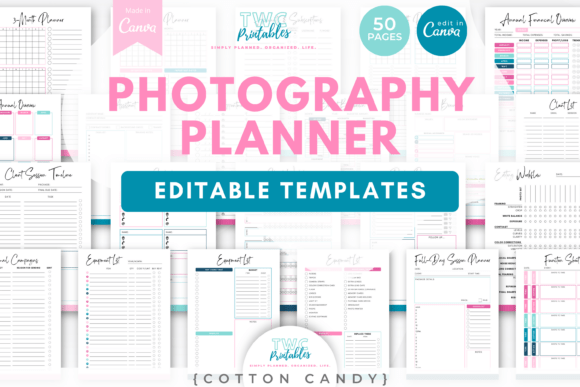
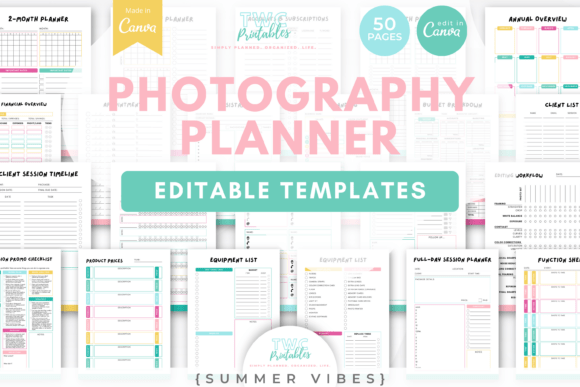
Let’s break down the practical utility of the 50 templates included. A common pitfall for photographers is the "reinventing the wheel" syndrome—creating a new checklist or contract for every single job. The Photography Planner Canva Templates solve this by providing structured starting points for every phase of a project.
For instance, the Mini-Session Planner and Mini-Session Promo Checklist are invaluable for high-volume seasons. Instead of guessing what needs to happen three weeks out, you have a roadmap. Similarly, the Location Scouting Sheet forces you to evaluate environments through a logistical lens, ensuring you haven't forgotten a permit or a lighting plan.
- Client Management: Use the Client Workflow Sheet to track leads from inquiry to delivery. This prevents promising a gallery delivery date you can't keep.
- Financial Clarity: The Income & Expenses Sheet and Budget Breakdown are essential for tax season. They help you visualize where your money is going—whether it's new gear or software subscriptions.
- Creative Prep: The Photo Shot List and Full-Day Session Planner allow you to storyboard your shoots mentally before you even pick up the camera.
Visual Hierarchy and Brand Consistency
While the templates are functional, their modern typography and layout structure play a critical role in how you process information. Good design isn't just about looking good; it's about readability and hierarchy. The layout of these planners uses visual cues to guide your eye to the most urgent tasks.
Consider the Marketing Workflow template. If you are using a chaotic spreadsheet, you might miss a crucial social media post. However, a well-designed, premium font-driven layout helps separate "To Do" from "In Progress" and "Done." This visual hierarchy reduces cognitive load. You spend less time reading and more time doing.
Furthermore, when you adapt these templates to your own studio's aesthetic, you are essentially engaging in editorial design for your business. You are curating how your business looks to itself. If you are a high-end wedding photographer, you might pair these templates with a serif font to convey elegance. If you are a street-style or family photographer, a sans serif font or even a handwritten font might better suit your vibe. The flexibility of Canva allows you to experiment with font pairing until the internal documents match the energy of your external marketing.
Practical Application: From Planning to Execution
The true value of the Photography Planner Canva Templates | SV is realized when you integrate them into your daily routine. It’s not enough to simply download the files; you must operationalize them.
Start by customizing the Annual Overview. Map out your peak seasons, holidays, and planned vacations. Then, use the 3-Month or 4-Month Planner to break those big goals into actionable quarters. For example, if your annual goal is to launch a new package, the quarterly view helps you schedule the Mini-Session Promo Checklist activities.
On a granular level, the Daily Planner and Time Log are your best friends for productivity. Many creatives struggle with time management because they underestimate how long editing takes. By logging your hours using these templates, you gather data. You might realize that you spend 40% of your time on admin tasks, prompting you to outsource or streamline specific processes using the Editing Workflow sheet.
Why Design Assets Matter in Business
In the creative industry, we often focus heavily on logo design and packaging design for our clients, but neglect the design of our own internal systems. The Photography Planner Canva Templates bridge that gap. They acknowledge that a photographer's business documents are part of their brand identity.
Imagine sending a Client Session Timeline that is a plain, text-heavy Word document versus one that is a beautifully branded PDF created from these templates. The latter communicates competence and care. It tells the client, "I have a system. I am organized. Your investment is safe with me."
This is particularly important for content creators and social media graphics specialists. If your business involves managing multiple shoots a week, the Appointments Sheet and Contacts templates become the backbone of your operation. They ensure that no client falls through the cracks and that every shoot is prepared for with the same level of professional rigor.
Final Thoughts on Implementation
Ultimately, the Photography Planner Canva Templates | SV are about control. They give you control over your time, your finances, and your client experience. They are not just design assets; they are business tools wrapped in beautiful modern typography.
Take the time to customize them fully. Don't just fill in the blanks—make them yours. Adjust the fonts, play with the colors, and print out the ones you need on your desk. When your planning tools look good and work well, you’re more likely to use them. And when you use them, your business runs smoother, your clients are happier, and you get to focus on what you actually love: taking photos.