iPhone 16 Series Phone Case Templates for Custom Designs
The release of a new iPhone generation is always a significant event for the creative community. It’s not just a new gadget; it's a new canvas. For designers, entrepreneurs, and hobbyists, the iPhone 16 series presents a fresh opportunity to create custom accessories, build a product line, or craft unique gifts. This is where having the right design assets becomes crucial. Specifically, a comprehensive set of iPhone 16 Series Phone Case Templates is the foundational tool that separates a professional result from a frustrating guess.
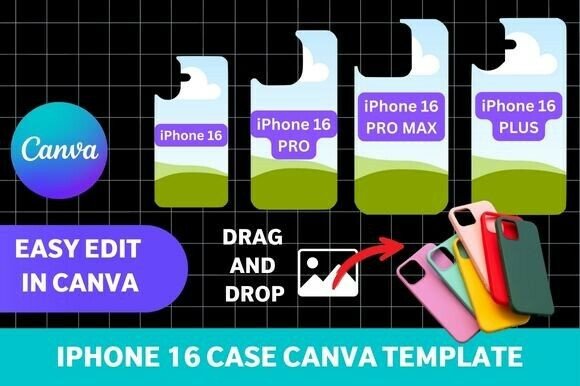
Imagine trying to design a product without knowing its exact dimensions or where the camera module sits. The result would be misaligned prints, awkward cutouts, and a finished product that feels amateurish. These templates solve that problem entirely. They provide a precise, scalable outline for all four models: the standard iPhone 16, the larger 16 Plus, the feature-rich 16 Pro, and the top-tier 16 Pro Max. This accuracy is non-negotiable for anyone serious about creating physical goods or realistic digital mockups.
Beyond Basic Outlines: The Anatomy of a Professional Template
A high-quality template is more than just a simple outline. It’s a multi-layered guide designed for production. For the iPhone 16 series, this means the template file includes not only the overall shape but also precise guides for the camera array, side buttons, and charging port. This level of detail ensures that any pattern, graphic, or logo you place will wrap around the phone correctly, avoiding critical areas. The appeal is in its versatility; the same template set can be used for sublimation printing, creating digital mockups for a client presentation, or generating printable designs for a craft project.
The real game-changer for many users is the integration with Canva. The iPhone 16 Series Phone Case Templates – Canva Editable format democratizes high-end design. You don't need to be an expert in Adobe Illustrator or Photoshop to use them effectively. Within Canva’s familiar drag-and-drop interface, you can fully customize the templates. This means adding intricate patterns, applying brand colors, inserting logos, or typing custom text becomes an intuitive process. It empowers small business owners, content creators, and crafters to produce merchandise that looks polished and cohesive.
Practical Applications: From Personal Projects to Commercial Ventures
The utility of these templates spans a wide range of creative and commercial projects. For a graphic designer or marketer, they are invaluable for creating realistic social media graphics or product listings. Instead of using a generic phone mockup, you can showcase your design on a photorealistic rendering of the latest iPhone, instantly boosting credibility and engagement. This is a subtle but powerful element of brand identity, showing customers you are current and detail-oriented.
For entrepreneurs and small business owners, these templates are the cornerstone of a custom merchandise operation. A phone case is a popular, high-margin product. With an accurate template, you can confidently design and sell cases through print-on-demand services or local craft fairs. The ability to create a consistent product line across all four iPhone 16 sizes is a significant business advantage. Similarly, for bloggers and content creators, offering a custom-designed phone case as a giveaway or a limited-edition item for their community can be a powerful way to deepen audience connection.
Making the Most of Your Template: Design Considerations
Once you have the template, the creative possibilities are vast, but a few practical considerations will elevate your work. First, think about visual hierarchy. The back of a phone case is a small space. Decide if your primary focus is a bold graphic, a subtle pattern, or text. Avoid cluttering the design; often, a single, well-placed logo or a seamless pattern that complements the phone’s color works best.
Second, consider the material and production method. A design for a sublimation case will have different color and contrast requirements than one intended for a clear case with a printed insert. Test your designs on a digital mockup first to see how they interact with the phone’s bezels and camera module. The template allows you to do this with precision, ensuring your final product looks intentional. Finally, think about your audience. A design for a tech-savvy professional will differ from one aimed at a college student or a parent looking for a personalized gift. The template is the tool, but your understanding of the end user informs the design.
In essence, these iPhone 16 Series Phone Case Templates are more than just files; they are a bridge between a creative idea and a tangible, professional product. They remove the technical barriers, allowing you to focus on what you do best: creating, branding, and connecting with your audience through thoughtfully designed accessories.