15 Horse Canva Frame Templates: Your Instant Design Solution
Finding the right visual element can make or break a project. You need something that captures a specific mood—in this case, the power, grace, and spirit of a horse—without spending hours searching stock sites or hiring an illustrator. That’s where these 15 Horse Canva Frame Templates come in. This isn't just another set of generic shapes; it's a curated collection of horse silhouettes delivered as editable frames, designed to integrate directly into your Canva workflow. Think of them as creative shortcuts for designers, marketers, and creators who need professional-quality assets fast.
What You're Actually Getting
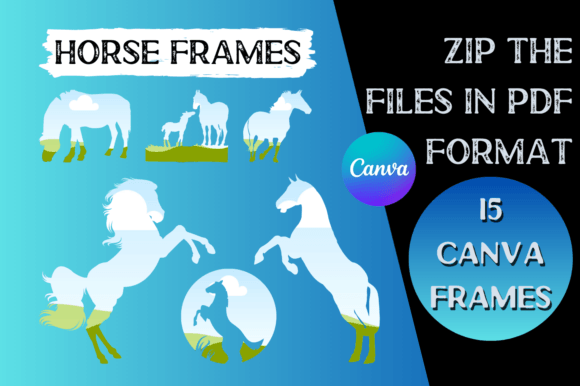
When you download this package, you receive a ZIP file containing 15 individual PDF files. Each PDF holds a single, high-resolution horse silhouette designed to function as a frame in Canva. The visual styles range from dynamic gallops and proud stances to gentle grazing poses, offering versatility for different themes. The aesthetic is clean and vector-based, meaning the lines are sharp and scalable for any project, from a small social media icon to a large print poster. These frames have a modern, graphic quality that feels both professional and accessible, avoiding overly ornate or dated illustrations.
The real value lies in their function. They aren't just static images; they are frames. This means you can easily place your own photos, text, or patterns inside the horse silhouette, creating a custom, integrated design in seconds. This simple mechanism is a game-changer for creating cohesive social media graphics, unique logo design concepts, or standout packaging design elements. The personality of these assets is versatile—suitable for equestrian brands, rustic themes, children's projects, or bold, artistic statements.
How to Use Them: A Straightforward Guide
The process is intentionally simple, removing technical barriers so you can focus on creativity. Here’s the direct path from download to design:
- Download the ZIP file from your purchase link.
- Unzip the folder to access the 15 individual PDF files on your computer.
- Open your Canva project. Drag and drop one of the PDF files directly onto your canvas.
- Canva will automatically upload the file. It will now live permanently in the "Projects" section of your left-side menu, under "Images" or "Uploads."
- Select your frame from the Projects panel and place it on your design.
- Remove the default image inside the frame (if one appears) by clicking on it and pressing delete or using the "Detach" option.
- The frame is now empty and ready for you to edit. Simply drag and drop any photo from your uploads, a solid color, or a pattern into the frame to fill it.
This method preserves the vector quality of the silhouette while giving you complete creative control over its interior. It’s a non-destructive, flexible approach that aligns with how modern creators actually work.
Where These Frames Make an Impact
Understanding where to use these design assets is key to maximizing their return. Their strength lies in adding instant thematic recognition and visual interest. For brand identity projects, a horse frame can serve as a central motif for a stable, ranch, equestrian apparel line, or even a financial services company wanting to convey strength and freedom. Use it in your logo as an icon, or as a recurring pattern on business cards and letterheads.
In editorial design and publishing, these frames are perfect for magazine covers, chapter headings in a book about horses, or feature images on a blog. They can break up text-heavy layouts and create a strong visual anchor. For web design, consider using a framed horse image as a hero section background, a team member photo holder on an "About" page, or an engaging element in a sidebar.
Content creators and marketers will find them invaluable for social media graphics. Create a consistent Instagram series where you showcase user-generated content inside different horse frames. Design compelling Pinterest pins for equestrian tutorials. Craft Facebook ads for riding lessons or horse shows that immediately grab the target audience's attention. The frames ensure your visuals are on-brand and highly shareable.
For small business owners and crafters, the applications are equally rich. Use them to design product labels for artisanal goods, create unique wedding invitations for a country-themed event, or develop custom merchandise like t-shirts and tote bags. The commercial license typically included with such templates allows you to use them in projects for sale, making them a practical investment. Always double-check the specific license terms provided with your download to ensure compliance for your intended use.
Making the Most of Your New Frames
Treat these 15 Horse Canva Frame Templates as a starting point, not a final product. Experiment with pairing them with different fonts. A bold serif font can enhance a traditional, authoritative feel, while a clean sans serif font keeps the look modern and minimal. For a more personal touch, a script font or handwritten font can complement the organic nature of the silhouette.
Think about color psychology. A black silhouette on a white background is classic and high-contrast. Filling the frame with a vibrant sunset photo creates energy. Using a muted, earthy color palette inside and around the frame can evoke a sense of calm and nature. The frame itself doesn't change, but the content you put inside it and the colors you surround it with will completely alter its mood and suitability for your project.
Ultimately, these frames are about efficiency and impact. They provide a professional visual hook that can elevate a design from ordinary to memorable. Whether you're building a brand from scratch, enhancing a client project, or adding a special touch to a personal creation, having a set of thematic, ready-to-use frames like these in your Canva toolkit is a practical move that saves time and boosts creative potential. They solve the common problem of finding the right graphic, allowing you to focus on the story you want to tell.